Blog

  • Running TwinCAT ADS Communication in Docker with TcpRouter

    Running TwinCAT ADS Communication in Docker with TcpRouter

    TwinCAT ADS Docker integration introduced some unexpected challenges during the containerization of a .NET application.

    The Initial Setup: TwinCAT ADS Communication Outside Docker

    One of the interesting projects I had the opportunity to contribute to was the integration with Beckhoff PLCs in the context of a .NET application.

    By using the TwinCAT libraries and, in particular, the TwinCAT ADS communication protocol, I was able to interface with and connect to the final machine.

    I carried out the implementation and subsequent tests directly on my local PC, with the TwinCAT ADS components installed. Finally, after configuring the Static Routes, I connected to the target, on which TwinCAT XAR was running with the related PLC project.

    Up to this point, I did not encounter any particular issues, since the ADS package on my PC included all the basic services strictly necessary for communication. I therefore only had to configure the routes once, in bidirectional mode, and everything was ready to go.

    The Challenge: Containerizing the Application

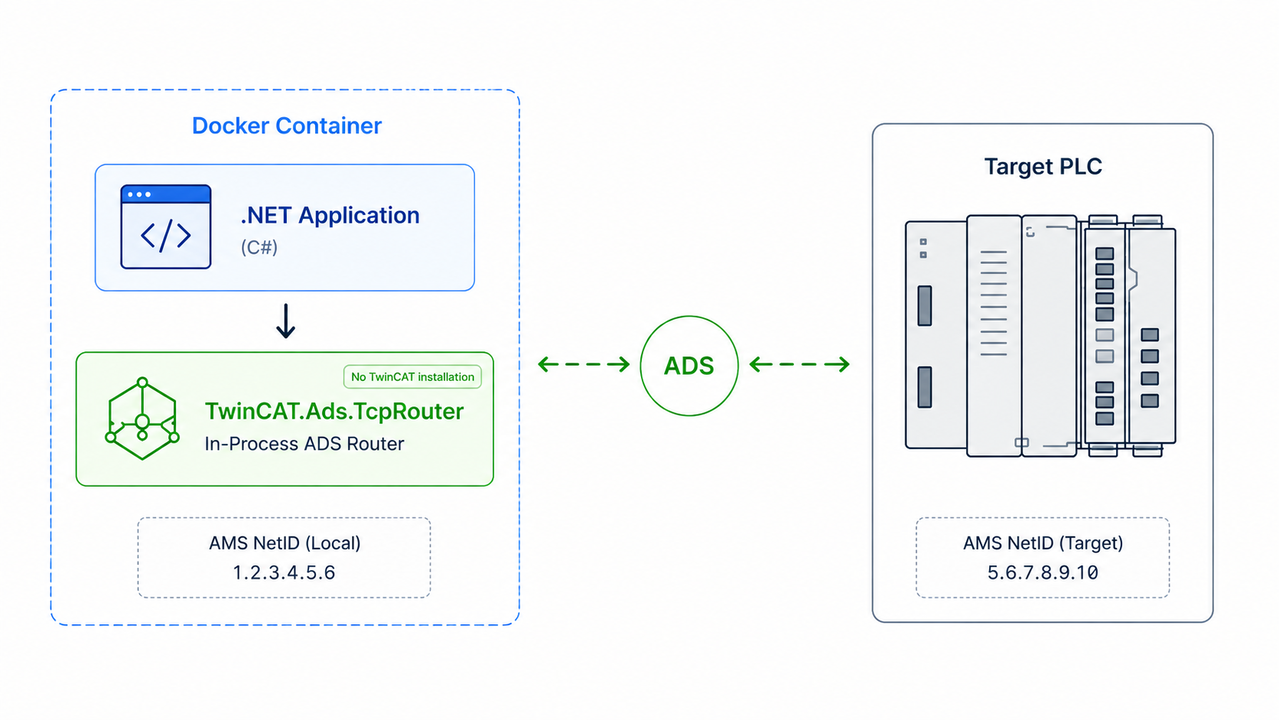
    At the end of the activity, the .NET application was functional and essentially completed. The only remaining step was containerization with Docker and the development of the Continuous Integration pipeline. This is where some issues began to arise, as the container had to be isolated and have a single responsibility, without TwinCAT installations or other third-party elements inside it.

    Evaluating ADS TCP Router

    After some research, my focus shifted directly to a possible solution which, from what I understood, seemed to solve exactly these types of cases. It is Beckhoff’s specific library: TwinCAT.Ads.TcpRouter.

    It is a direct and effective way to replace the installation of the local router as software with a lightweight in-process router within the codebase. The trade-off, as you can imagine, was integrating it into my implementation.

    I had not yet made the final decision, as I was still skeptical. I first wanted to carry out a Proof of Concept to validate this solution, observe how many modifications would be required, and above all determine whether I could connect to the target PLC from the container without the “router instance missing” error reported by TcAdsClient().

    Proof of Concept: Running ADS Communication Inside Docker

    The test was not as complicated as I had initially imagined. By configuring a local AMS NetID to be used within the container’s application context, the TcpRouter had to be started before the ADS connection so that it could be detected.

    The router started successfully and, after some attempts and reconfigurations, I was finally able to establish the connection with the target AMS NetID, all within the same local subnet.

    Once the feasibility had been demonstrated, I carried out the complete integration within the application.

    One of the subsequent checks was the complete deactivation of all active TcSysSrv services and their dependencies on my PC. In this way, I wanted to isolate my tests within the container without conflicts with the host components. The check was completed successfully.

    The Hidden Issue: Static Route Authorization

    A further test involved changing the static IP address of the host to a new one, without using the local router on my PC to perform the bidirectional authorization. The idea was to see what would happen if the TcpRouter inside the container handled everything for the first time.

    The router started correctly, but the connection to the target remained unreachable. At first, I thought it was a matter of network isolation between the host and the container, but that was not the case. In fact, the container was running in bridge mode, and the IP addresses were consistent and correctly mapped with the AMS NetIDs.

    The issue was something else: TcpRouter creates a connection that requires an authorized response from the target. Therefore, since the destination machine had not defined in its Static Routes the AMS NetID used in the container, it rejected the connection. The solution was to access the target’s Static Routes and add the mapping between the source IP address (the host’s IP address, which the target sees because of NAT) and the AMS NetID used by TcpRouter.

    One piece of advice I would give is not to use the “Broadcast Search” option in the dialog for adding a new route, because it does not automatically update the table. I entered everything manually and only saw the changes after refreshing the route list in the underlying window. In my opinion, the user experience of managing Static Routes in TwinCAT could be improved.

    Closing Thoughts

    This experience was very positive for me. In the end, it was interesting to see the complete communication flow from the container to the destination, managing to configure everything in an isolated, reproducible, and automated way. Containerizing an application is an additional layer of complexity that can sometimes require more effort than expected.

    Official References

    The following official Beckhoff resources provide additional information about the technologies discussed in this article:

    Thank you for reading.

  • Why I Started Single Concern

    Welcome to Single Concern, my virtual space!

    My name is Tayfun, and I graduated in Computer Science and Engineering from Politecnico di Milano, with a particular interest in software engineering and artificial intelligence.

    I find the idea of sharing projects, reflections, and decisions made throughout one’s professional career particularly interesting.
    Many things we learn gradually fade over the years until they are forgotten. This is even more true in our field, where everything moves at an incredible pace.

    For this reason, I would like to keep track of what I do, what I learn, and above all, the decision-making process behind the choices I make.

    The goal of this blog is precisely that: to build a public space, entirely managed by me, where I can freely share my point of view on the topics I have studied and gained experience in.

    Writing forces us to clarify our thoughts. Documenting is valuable both for myself and for anyone who reads it.

    One of the core principles I appreciate most in software architecture is the Separation of Concerns (SoC). Dividing a system into multiple parts, each focused on a specific problem, brings many benefits: reusability, extensibility, and maintainability, just to name a few.

    It is a concept that I have always tried to apply across the different programming languages, frameworks, and projects I have worked on. This way of thinking can also be applied to real-world problems. For example, how we study, reason, and break down complex issues.

    That explains the name of the blog: “Single Concern” comes directly from this mindset.

    While writing my articles, I will use artificial intelligence as a support tool. The goal is to write the way we used to some time ago: manually, one paragraph at a time.

    Perhaps this is a somewhat unconventional choice, especially at a time when AI is being used almost everywhere to automate more and more activities. However, I would like the ideas and reasoning shared here to be the result of my personal experience and genuinely mine. The interesting and rewarding part is precisely this: writing and communicating in my own voice.

    At the same time, I do not want to rule out AI-generated articles altogether. If I ever publish one, it will be placed in a dedicated category so that this is always clear and explicit for the reader.

    If you’d like to have a chat, discuss any of the topics covered here, or explore my projects, feel free to get in touch!

    💻 GitHub (My projects)

    👔 LinkedIn (Let’s connect)

    ✉️ Email: tayfun.gumus@proton.me